Blog

  • The Best of Both Worlds: Why We Pair Astro with a Headless WordPress Backend

    The Best of Both Worlds: Why We Pair Astro with a Headless WordPress Backend

    WordPress is the most intuitive content editor on the internet. It is also a massive liability when its frontend is exposed to the public web.

    I have spent over two decades building digital infrastructure, and I constantly see business owners forced into a false choice. They either suffer the bloat, slow load times, and constant security patching of a traditional WordPress monolith, or they migrate to a blazing-fast static site builder but force their non-technical team to write articles in raw markdown code.

    At DYGYX, we refuse to compromise. We use a Headless WordPress and Astro architecture. It is the definitive way to build a modern, high-performance content platform in 2026.

    Here is why decoupling your backend from your frontend is a massive win for your business.

    The problem with the monolith

    In a traditional setup, your content database and your public website are tangled together in one massive application.

    Every time a visitor clicks a link to read your blog, your server has to boot up PHP, query a MySQL database, fetch the content, fetch the theme files, run dozens of plugins, and stitch it all together into an HTML page on the fly.

    It is incredibly inefficient. It leads to terrible Time to First Byte (TTFB) scores, and it leaves your database permanently connected to the public internet, acting as a magnet for automated attacks and malware.

    The headless solution

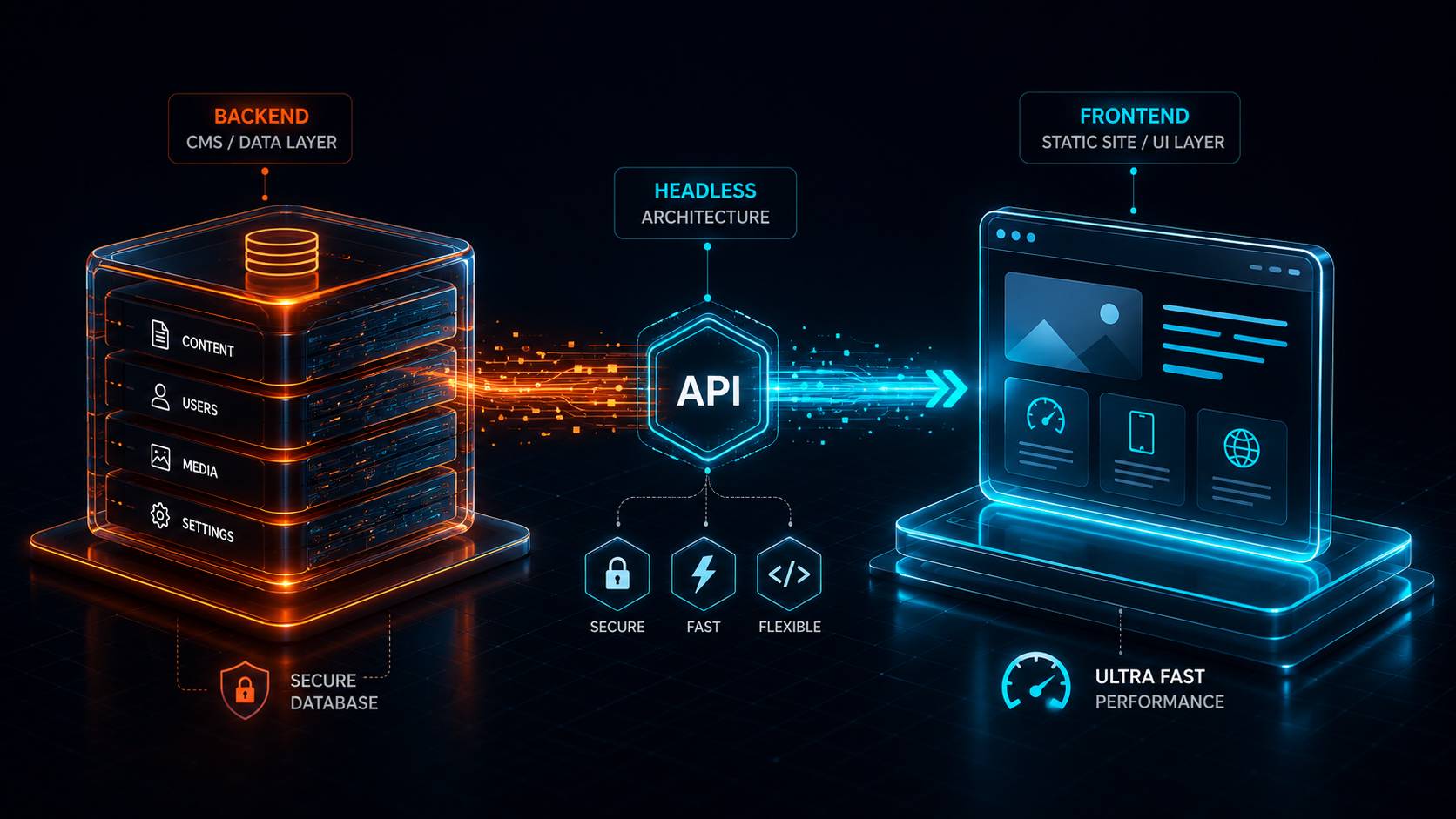
    A “headless” architecture takes a chainsaw to the monolith. We completely sever the WordPress backend from the public-facing website.

    1. The Backend (WordPress): We lock WordPress down on a hidden, private URL. We use it purely as a database and a writing interface. The familiar Gutenberg editor, media library, and SEO tools remain exactly the same.
    2. The Frontend (Astro): We build the actual website using Astro, a modern static site generator.
    3. The Bridge (The Webhook): When we click “Publish” in WordPress, a silent webhook pings our global edge network (Cloudflare). Astro reaches into WordPress via a secure API, downloads the new article, bakes it into a pure, static HTML file, and pushes it to servers worldwide.

    Why this architecture wins

    Unbreakable Security You cannot hack a server that has nothing to hack. Because Astro generates flat HTML files, there is no database connected to your live website. There is no wp-admin login page for bots to brute-force. There are no vulnerable PHP plugins running on the frontend. The attack surface is completely eliminated.

    Zero Editorial Friction Most static sites require you to manage content in a code editor. With a headless setup, your writers and marketers never have to look at a line of code. They write in the visual WordPress editor they already know. They generate alt text, set featured images, and write meta descriptions using SEOPress, just like they always have.

    Answer Engine Optimization (AEO) AI search tools like Perplexity and Google’s AI Overviews struggle to parse the heavy, nested <div> blocks generated by traditional WordPress page builders. Astro outputs pristine, semantic HTML with zero JavaScript bloat. When an Answer Engine crawls a headless Astro site, the signal-to-noise ratio is perfect. It finds your facts, your schema markup, and your expertise instantly.

    Millisecond Performance Because the pages are pre-built and served directly from an edge cache, the load times are nearly instantaneous. You get perfect Core Web Vitals, sub-100ms TTFB, and a user experience that never stutters, regardless of how much traffic hits the site at once.

    The bottom line

    You do not have to choose between a fast website and an easy-to-use content manager. By pairing the world’s most popular editor with the world’s fastest static web framework, you get the absolute best of both worlds.

    This is exactly how the DYGYX platform operates, and it is the architecture we recommend for businesses that treat their website speed and security as revenue-driving assets.

    Curious if a headless architecture makes sense for your content operations? Message me on WhatsApp at @gtongco. I will take a look at your current setup and give you a straight answer.


  • Why We Build with Astro Instead of WordPress in 2026

    Why We Build with Astro Instead of WordPress in 2026

    WordPress is not a bad platform. It is a platform that outgrew what most businesses actually need. In 2026, if you are running a corporate website, a marketing site, or a small business presence, you are paying for a database, a PHP processor, and a content management backend that runs on every single visitor request. Astro does none of that. It builds your whole site once as static HTML files and serves them instantly. No database calls. No PHP boot-up. No attack surface.

    I have been building websites and hosting infrastructure for over 20 years. I started with raw HTML, moved through PHP, built on WordPress for clients, and watched the CMS balloon into something that now requires a dedicated security team just to keep the login page safe. Astro is the first tool in years that made me stop and say: this is how websites should work.

    Let me break down why we moved and why you should consider it too.

    The legacy treadmill

    WordPress in 2026 is a maintenance job disguised as a website. Here is what you are managing:

    Plugin debt. The average business WordPress site runs 20 to 30 plugins. Every plugin is a dependency written by someone else. Every update can break your site. Every outdated plugin is a security hole. You end up spending more time updating plugins than creating content.

    Page builder bloat. Drag-and-drop builders like Elementor and Divi generate enormous blocks of nested HTML. A single page can produce 5,000 lines of markup. Google’s crawlers and AI tools have to sift through all that garbage to find your actual content. The result is slower load times and worse rankings if your business depends on search traffic.

    Database dependency. Every visitor triggers a PHP request that connects to a database, runs queries, and builds a page on the fly. That is overkill for a site whose content changes once a week. You are burning server resources on every single visit just to assemble a page that could have been saved as a flat file.

    Security overhead. WordPress is the most targeted CMS on the internet. Login pages get brute-forced constantly. Outdated plugins get exploited. Compromised admin accounts turn your site into a malware distribution point. You either pay for security plugins and monitoring, or you accept the risk.

    I am not saying WordPress cannot work. It works great for blogs, membership sites, and anything that needs dynamic user content. But for a standard business website, you are carrying a lot of weight you do not need.

    The Astro advantage

    Astro takes a different approach. It is a static site builder. That means at build time, Astro generates plain HTML files for every page on your site. When a visitor arrives, the server just hands them a file. No PHP processing. No database connection. No waiting.

    Zero JavaScript by default. Astro sends zero JavaScript until you tell it to. That is the opposite of every modern framework that ships hundreds of kilobytes of JS on first load. Your pages load fast because there is almost nothing to load.

    Component-based but output is flat. You build your site using reusable components. But the output is still static HTML. You get the development speed of a modern framework and the performance of a 1990s brochure site. Best of both worlds.

    Markdown-friendly. Content lives in plain markdown files checked into your repository. No database. No admin panel. Your content is version controlled, easy to edit, and easy to move if you ever switch tools.

    Builds on your existing hosting. Astro produces flat files. You can host them anywhere. S3, Netlify, Cloudflare Pages, or a plain Apache server. No special requirements. No PHP version to maintain.

    For our own site at Dygyx, Astro produces pages that load in under a second on a shared hosting plan. That is not because we are doing anything fancy. It is because there is nothing to compute at request time.

    Bulletproof security

    Here is the simplest security truth in web development: you cannot hack what is not there.

    A static HTML file has no login page. No admin panel. No database credentials in config files. No PHP execution. No plugin vulnerabilities. No SQL injection. No session hijacking.

    WordPress gets attacked every single minute of every day because it presents a target. Astro presents nothing. Your site is a folder of HTML files on a server. That is it.

    I have spent years helping clients clean up compromised WordPress installations. The cleanup always follows the same pattern: remove the malware, update everything, change all passwords, hope it does not happen again. Astro eliminates the entire category of attack. Not reduces. Eliminates.

    For a business owner who does not want to think about website security, that alone is the deciding factor.

    Answer Engine Optimization (AEO)

    Search is changing. AI tools like ChatGPT, Perplexity, and Google’s AI Overviews are rewriting how people find information. These tools do not browse the web like a human. They crawl and parse code looking for clean, structured content to cite.

    Astro naturally produces exactly what AI crawlers want. Clean HTML. Semantic markup. Minimal nesting. No plugin-generated noise. No inline styles from page builders. The content-to-markup ratio is high.

    WordPress pages, especially those built with drag-and-drop tools, are the opposite. AI parsers have to strip away layers of nested divs, inline scripts, and generated styles to find the actual text. Sometimes they give up and cite a competitor’s cleaner page instead.

    I call this the invisible tax of heavy CMS platforms. You cannot see it in your analytics. But your content is getting filtered out by AI tools because the signal-to-noise ratio is bad. Astro flips that. Your content is the signal.

    When should you stick with WordPress?

    I try to be honest about these things. WordPress is still the right choice if:

    • You need a full content management system for multiple editors who are not technical.
    • You run a membership site, a learning management system, or an ecommerce store with complex product logic.
    • You rely on plugins for specific functionality that has no static alternative.

    But if your site is a marketing presence, a corporate brochure, a portfolio, or a blog with occasional updates, you are paying for features you never use. Astro gives you a faster, safer, simpler site that costs less to run.

    The bottom line

    WordPress dominated because it made building a website accessible to everyone. Astro matters because it makes building a fast, secure, AI-friendly website simple. The industry is moving toward static output and zero runtime overhead. That is not a trend. That is the internet correcting for years of bloat.

    If you want to see what a fully static, zero-database site looks like in practice, browse Dygyx. Every page on this site is a flat HTML file. No PHP, no database, no admin panel. It loads fast, it stays secure, and AI tools love reading it.

    Have questions about moving your current site off WordPress? Message me on WhatsApp at @gtongco. I will give you an honest assessment of whether the move makes sense for your setup.

  • Beyond SEO: Getting Your Website Ready for AI Search

    Beyond SEO: Getting Your Website Ready for AI Search

    Search changed. You might not have noticed yet, but the way people find businesses online is shifting from traditional search engines to something different. Tools like ChatGPT, Perplexity, Google AI Overviews, and Claude do not work the same way Google’s old blue-link results worked. They are Answer Engines. They read your site, extract facts, and present those facts directly to the user. If your website is not built to feed these tools clean information, you are invisible in the fastest-growing search channel on the internet.

    I have been building websites and digital infrastructure for over 20 years. I watched SEO evolve from keyword stuffing to link building to Core Web Vitals. This shift to Answer Engine Optimization is the biggest change I have seen. And most business owners do not even know it is happening.

    How Answer Engines are different from traditional search

    Traditional search engines work like a library catalog. They crawl your site, index your pages, and return a list of links when someone searches. The user clicks a link and visits your site. The transaction is: search, click, visit.

    Answer Engines work differently. They crawl your site, extract specific facts, and present those facts directly to the user without requiring a click. When someone asks “What is the best web hosting company that locks in pricing?” the Answer Engine reads multiple sites, picks the most authoritative and clear answer, and presents it right there in the chat. No click. No visit. The answer is the destination.

    This changes everything about how you should build your website.

    What Answer Engines need from your site

    Answer Engines look for three things. Your site needs all three to get cited.

    Clean, structured code. AI tools parse your HTML to find content. They do not want to wade through 5,000 lines of page-builder garbage to find your main paragraph. They want clean, semantic markup where the heading says what the section is about and the paragraph below it answers the question.

    I see so many business websites built with drag-and-drop tools that generate a mess of nested divs, inline styles, and script tags. An AI parser has to strip all of that away to find the actual content. Sometimes the parser gives up and moves to a cleaner site. Your competitor’s cleaner site.

    Clear answers presented directly. If your site dances around a topic with marketing language and vague claims, the Answer Engine cannot confidently cite you. You need to state answers plainly. “DYGYX locks your hosting rate for life. It is written into our Terms of Service.” That is a clear, citable fact. “We offer competitive pricing with industry-leading value” is not. Answer Engines skip vague language.

    Properly structured background data. This is the technical piece that most sites get wrong. There is a standard format called schema markup that lets you tell search tools exactly what your business is, what you offer, and what your policies are. It looks like code behind the scenes, but the effect is simple: an Answer Engine reads your schema and knows with high confidence that you are a web hosting company, that you offer shared hosting for $2.99/month, that your price is locked for life, and that you serve customers in the United States.

    Every page on the DYGYX site has this background data built in. That is why AI tools can pull our pricing, our policies, and our uptime guarantees directly into their answers.

    What happens if you ignore this

    The cost of ignoring Answer Engine Optimization is not immediate. Your site will still work. People can still find you through Google. But you will slowly lose visibility to competitors who structure their sites for AI consumption.

    Here is what I see happening in practice. A business owner spends $5,000 on a beautiful WordPress site with a fancy page builder. The site looks great. But behind the scenes, the code is a mess. An AI tool crawls the site and finds 8,000 lines of markup for a single page. It cannot confidently extract the business hours, the pricing, or the service area. The tool moves to a simpler site. The cleaner site gets cited. The fancy site does not.

    That same business owner does not know they are losing traffic. They cannot see “AI citations” in their analytics. The leads just stop coming.

    How DYGYX builds for AI search

    This is not a side feature for us. It is how we build every site.

    Our sites are built on Astro, which produces clean, minimal HTML by default. No database calls. No PHP processing. No page builder bloat. Just clean markup that AI tools read easily.

    We embed structured data into every page. Our hosting plans, our guarantees, our policies, our founder information all have schema markup that tells Answer Engines exactly what to cite.

    We write content that answers questions directly. No fluff. No vague claims. If we say the price is locked for life, we tell you it is in the Terms of Service, and we structure that information so an AI tool can verify it.

    The bottom line

    Traditional SEO is not dead. Keywords and backlinks still matter. But Answer Engine Optimization is growing faster. The site that wins in 2027 and beyond is the site that makes itself easy for AI tools to read, understand, and cite.

    If you want a site built specifically for this new search era, DYGYX builds exactly that. Clean code. Structured data. Direct answers. And your hosting rate stays locked for life.

    Want me to check whether your current site is AI-ready? Message me on WhatsApp at @gtongco. I will run a free analysis and tell you where you stand.

  • The ‘Unlimited’ Hosting Myth: Why Your Website Deserves Better

    The ‘Unlimited’ Hosting Myth: Why Your Website Deserves Better

    “Unlimited bandwidth.” “Unlimited storage.” “Unlimited everything.”

    You have seen these words on every hosting site for the last fifteen years. They are the most effective marketing phrase in the industry. They are also a complete fiction. There is no such thing as unlimited on a physical server. Every server has a finite amount of disk space, a finite amount of network throughput, and a finite amount of CPU power. When a host promises unlimited, they are promising something they cannot deliver. They are betting you will never actually try to use it.

    I have been in this industry for over 20 years. I have run hosting companies, built data center infrastructure, and watched the same “unlimited” trick get pulled on business owners again and again. It is time to explain how it actually works.

    What “unlimited” really means

    Every hosting provider has a terms of service document. Buried in that document is the fine print that defines what “unlimited” actually means. It usually says something like “unlimited as long as you stay within the average usage of a shared server.” That is not unlimited. That is a fuzzy limit that the host gets to define after you sign up.

    Here is what happens in practice:

    Unlimited storage means you can use as much space as the other 200 sites on the same server leave for you. The host oversells the server. They put 200 or 300 sites on a single machine, knowing that most sites will use only a few hundred megabytes. If your site grows and actually uses significant storage, you start getting emails about “fair use” policies. Eventually you get suspended or forced onto a more expensive plan.

    Unlimited bandwidth works the same way. A single gigabit network port can handle only so much traffic. The host divides that port among hundreds of customers. If your site gets popular and starts using real bandwidth, you get throttled or cut off.

    I have seen a client get their “unlimited” hosting account suspended for using 10 gigabytes of storage on a WordPress site with a lot of images. The host called it “excessive use.” The client called it “using what I paid for.” The host won because the fine print gave them the right to decide what excessive means.

    The renewal trap

    The unlimited promise serves a second purpose. It gives hosts a reason to charge a low introductory price while planning to triple or quadruple the rate at renewal.

    The logic goes like this: sell a $2.99/month “unlimited” plan for year one. Lose money on year one. Make it up on years two, three, and four when the price jumps to $14.99 or $19.99. The unlimited promise gets you in the door. The switching cost keeps you there.

    DYGYX does not do this. Our shared hosting plans have clear, honest limits. You know exactly how much storage and bandwidth you get, and the price never changes after you sign up. Same price. Every year. No surprises.

    What to look for instead of unlimited

    When you evaluate a hosting plan, ignore the unlimited promise. Look at these things instead:

    Hard numbers. A good host tells you exactly how much storage and bandwidth you get. Our shared plans start at 10 GB NVMe storage and 100 GB bandwidth. Those are real numbers on real hardware. You can plan around them.

    Real performance. Unlimited on a crowded server is worse than limited on a well-managed one. A site on a server with 50 other accounts will outperform a site on a server with 300 other accounts, even if the latter has “unlimited” on the label.

    Pricing transparency. Does the price lock for the life of the account, or does it expire after the first term? DYGYX guarantees the same rate forever. No renewal hike. No fine print.

    Overselling ratio. Ask how many sites are on a shared server. Most hosts will not tell you. We cap our servers at a reasonable number so every site gets real resources.

    The bottom line

    “Unlimited” hosting is a marketing invention, not a technical reality. Every server has limits. The only question is whether those limits are disclosed up front or hidden in a terms of service document that you discover after your site gets suspended.

    If you want hosting with honest limits, real hardware, and a price that does not triple after year one, take a look at DYGYX. The numbers are on the page. The price on your first invoice is the price on your hundredth invoice. No unlimited promises. No renewal surprises.

    Questions about your current hosting plan? Message me directly on WhatsApp at @gtongco. I will tell you honestly whether you are getting a good deal or paying for marketing fluff.

  • What Is 99.9% Uptime Worth? The Real Cost of Website Downtime for Small Business

    What Is 99.9% Uptime Worth? The Real Cost of Website Downtime for Small Business

    What does 99.9% uptime actually mean?

    Uptime percentages look impressive in marketing copy. The math behind them is what matters. Here is what each common SLA tier translates to in real downtime:

    • 99.9% (“three nines”): up to 43.2 minutes/month or 8.8 hours/year
    • 99.95%: up to 21.6 minutes/month or 4.4 hours/year
    • 99.99% (“four nines”): up to 4.3 minutes/month or 52.6 minutes/year
    • 99.999% (“five nines”): up to 26 seconds/month or 5.3 minutes/year

    The gap between “three nines” and “four nines” is roughly 8 hours of downtime per year. A full business day your site is dark.

    How much does website downtime cost a small business?

    The cost depends on your daily online revenue. The formula is simple: (daily revenue / 24) × hours down.

    • $500/day online revenue: 8.8 hrs/year of 99.9% downtime = ~$183 lost per year. A single bad outage during peak hours can cost far more.
    • $2,000/day online revenue: same 8.8 hrs = ~$733/year. A 4-hour peak outage alone costs ~$333.
    • $10,000/day online revenue: 8.8 hrs = ~$3,667/year.

    These are just the direct recoverable losses. The hidden costs are larger.

    What are the hidden costs of downtime?

    Direct revenue loss is the part you can measure. The harder costs show up weeks later.

    • Lost search rankings: Google’s crawler hits a down site, flags it unreliable, and deranks you. A multi-hour outage can take weeks of ranking recovery.
    • Broken trust: first-time visitors who see an error page rarely return. You spent money to acquire them. Downtime throws that acquisition cost away.
    • Email disruption: if email is on the same host, downtime means missed leads, missed support tickets, and missed customer replies.
    • Reputational drag: review sites, social mentions, and word-of-mouth capture the outage even after you are back online.

    Is 99.9% uptime good enough?

    For a personal blog, yes. For a business that depends on its website for leads or sales, 99.9% is the floor, not the goal. And only if the host actually honors it. Many cheap hosts advertise 99.9% with no compensation when they miss it.

    A meaningful SLA has three parts:

    1. A real target (99.95% or better).
    2. Monitored, not self-reported. Trust third-party status pages over the host’s own dashboard.
    3. A consequence for missing it. Service credits or refunds, not just an apology.

    How do I improve website uptime?

    Uptime is the product of three layers: hosting infrastructure, monitoring, and a recovery plan.

    • Hosting: choose a host with redundant infrastructure (multiple power, network, and storage paths), active monitoring, and a published status page.
    • Monitoring: run a third-party uptime checker (UptimeRobot, Better Stack) so you know about downtime before your customers do.
    • Backups: daily or hourly off-site backups so a bad update or attack never becomes permanent downtime.
    • Caching/CDN: an edge cache keeps your site partially online even if the origin hiccups.

    The bottom line

    Every “nine” in your uptime SLA is real money. The gap between an advertised SLA and an honored one is where small businesses get quietly hurt. If you want hosting that treats reliability as a financial commitment rather than a marketing line, look at Dygyx shared and managed WordPress plans. 99.9% uptime, 24/7 human monitoring, and a price locked for life. Want me to assess your current host’s real uptime? Message me on WhatsApp at @gtongco and I will take a look, no obligation.

  • How Fast Should Your Website Be? TTFB, Core Web Vitals, and Why Speed Matters

    How Fast Should Your Website Be? TTFB, Core Web Vitals, and Why Speed Matters

    What is TTFB and why does it matter?

    TTFB stands for Time to First Byte. It is the time between a browser requesting a page and receiving the first byte of the response. It measures the server plus network round-trip before rendering even begins. A high TTFB delays everything downstream. No amount of front-end optimization fixes a slow server.

    • Excellent: under 200ms
    • Acceptable: 200 to 600ms
    • Poor: over 600ms (Google flags this as needing improvement)
    • Dygyx target: ~42ms edge-cached, under 200ms origin

    What are Core Web Vitals?

    Core Web Vitals are Google’s three standardized signals for measuring real-world user experience. They directly influence search rankings and AI answer selection.

    • Largest Contentful Paint (LCP): how fast the main content loads. Target under 2.5 seconds.
    • Interaction to Next Paint (INP): how fast the page responds to input. Target under 200ms.
    • Cumulative Layout Shift (CLS): how stable the layout is. Target under 0.1.

    How does website speed affect conversions?

    Speed has a direct, measurable impact on revenue. Users abandon slow sites before they ever see your offer.

    • Google/SOasta research: as page load time goes from 1s to 3s, bounce probability jumps 32%. At 5s, it is 90%.
    • Deloitte Mobile Insights: a 0.1s improvement in load time lifted retail conversion rates by 8.4%.
    • Amazon (industry-cited): a 100ms delay cost an estimated 1% of sales.

    For a small store doing $5,000/month, a 1-second improvement can mean $400 to $500 more per month. Purely from speed.

    How fast should a WordPress site be?

    A well-built WordPress site on good hosting can hit the same Core Web Vitals targets as a static site. But only if the hosting stack is tuned. Out-of-the-box WordPress on cheap shared hosting typically scores 3 to 6 second LCP. Well above the 2.5s threshold.

    To get WordPress fast:

    • Use NVMe storage, not spinning disks. Database queries are 5 to 10x faster.
    • Enable object caching (Redis) and a full-page cache.
    • Put it behind a CDN/edge cache so visitors hit a nearby node, not your origin.
    • Keep PHP updated. PHP 8.2+ is roughly 20 to 30% faster than PHP 7.4.

    Does hosting affect website speed?

    Yes. Hosting is the single biggest factor in TTFB, and TTFB sets the floor for every other metric. You cannot optimize your way out of a slow server.

    Hosting factorImpact on speed
    Storage type (NVMe vs SSD vs HDD)Database and file reads: 2 to 10x difference
    Server location / edge cacheTTFB: 50 to 500ms difference per request
    Dedicated vs shared resourcesStable vs noisy-neighbor slowdowns under load
    PHP version + opcache20 to 30% execution speed

    How do I test my website speed?

    Run these three free checks, in this order:

    1. PageSpeed Insights (web.dev/measure). Core Web Vitals on real Chrome users.
    2. GTmetrix or WebPageTest. Waterfall view to see exactly which request is slow.
    3. Your host’s TTFB. Run curl -w "%{time_starttransfer}" -o /dev/null -s https://yoursite.com. Anything over 0.6s is a hosting problem, not a design problem.

    The bottom line

    Speed is not a vanity metric. It is conversion, ranking, and AI-visibility in one number. If your site is slow at the server level, no theme or plugin will save you. Move to Dygyx managed WordPress or shared hosting with NVMe storage and edge caching. Your renewal rate stays locked for life while you are at it. Questions about your current setup? Message me on WhatsApp at @gtongco and I will run a free speed check on your site.

  • Why Do Web Hosts Increase Renewal Prices? The Bait-and-Switch Explained

    Why Do Web Hosts Increase Renewal Prices? The Bait-and-Switch Explained

    Most web hosts increase renewal prices by 200% to 500%. They use an introductory bait and switch model. Sell the first year at a loss to acquire you. Then rely on the hassle of migrating a website to trap you into paying inflated renewals. The low sign-up price is a marketing cost they recover from you later. It is not the real price of hosting your site.

    Why do web hosts increase renewal prices?

    Hosts increase renewal prices because their business model depends on it. The advertised $2.99/month rate is a customer-acquisition cost, not a sustainable price. Once your website is live, your email is tied to the domain, and your customers bookmark the URL, moving becomes painful. Hosts exploit that switching cost.

    • Introductory loss leaders: The first year is often sold below cost. One industry analysis of 14 mainstream hosts found the average renewal increase is roughly 300% for shared hosting.
    • Silent auto-renewal: Most plans auto-renew on a card already on file. By the time you notice the higher charge, the billing cycle has closed.
    • Switching friction: Migrating DNS, email, databases, and SSL certificates takes hours. Hosts calculate that most customers will pay the higher rate rather than risk downtime.
    • Investor pressure: Private-equity-owned hosts are required to grow revenue per customer. Renewal hikes are the fastest lever.

    How much do hosting prices go up at renewal?

    The increase varies by provider and plan. The pattern is consistent across the industry.

    • Shared hosting: commonly jumps from $2.99 to $11.99 or $19.99/month. A 300% to 500% increase.
    • Managed WordPress: typically rises from $9 to $29 or $49/month at renewal.
    • VPS plans: less extreme, but $6 intro plans regularly renew at $24+/month.

    For a small business on a 3-year shared plan, that is the difference between $108 and $432 to $684 over the term.

    Is the introductory price a scam?

    It is not legally a scam. The renewal price is disclosed in the fine print. But it is designed to be missed. The headline price is what you see in search results and ads. The renewal price is buried two clicks deep in the checkout flow. That gap between what you saw and what you pay is the entire business model.

    How do I avoid hosting renewal price increases?

    The only reliable way to avoid renewal hikes is to pick a host that guarantees a locked price in writing. Not a marketing promise. A contractual term.

    1. Read the renewal terms before you buy. If the host will not put “your renewal price will never increase” in the agreement, assume it will.
    2. Avoid long prepay traps. A 3-year intro lock delays the hike. It does not prevent it. Year 4 is when the increase hits.
    3. Choose a host with a lifetime price lock. At Dygyx, the rate you sign up at is the rate you pay in 2036. Written into our Terms of Service, not a footnote. Our managed WordPress plans carry the same guarantee for content-driven business sites.

    What is a Lifetime Price Lock Guarantee?

    A Lifetime Price Lock Guarantee is a contractual promise that your recurring hosting rate never increases for the life of your account. It is different from an introductory lock. There is no second price waiting for you after year one, year three, or year ten. The number on your first invoice is the number on your hundredth invoice.

    The bottom line

    You do not have to accept renewal hikes as “just how hosting works.” They are a choice hosts make. And a choice you can refuse. If you are tired of budgeting around a price that triples every renewal, claim a Dygyx Founder’s Rate on our shared hosting plans and lock it for life. Or reach out to me directly on WhatsApp at @gtongco. I will personally walk you through the migration, no scripts, no queue.